include ("../../hdesk.head") ; ?>
How can I check
to see if my phone line supports 56K ?Follow the directions given there to see if your phone line is clean enough to handle the connection.
If it says your phoneline cannot handle 56K connections, then it will not help to call the 56K modem pool. Also, your connection speeds will not increase over the standard modem rates you have been getting if you have just purchased a 56K modem.
What are the
access numbers for 56K service?
All of the WCNet's dialup points are now 56K capable. Please see the phone numbers page for more information.
Blade Article
on 56K modems and their speed
An article by Michael Woods, the Toledo Blade technology writer, describing
why 56K modems are not that fast is located here.
I'm
sometimes cut off after only a few seconds The Buffer Fix!
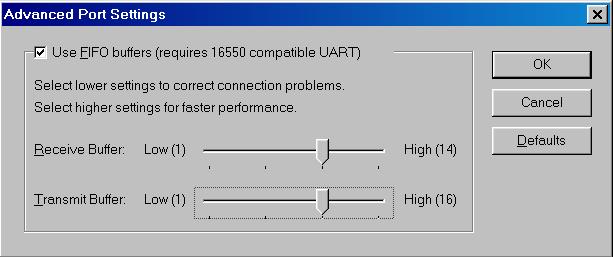
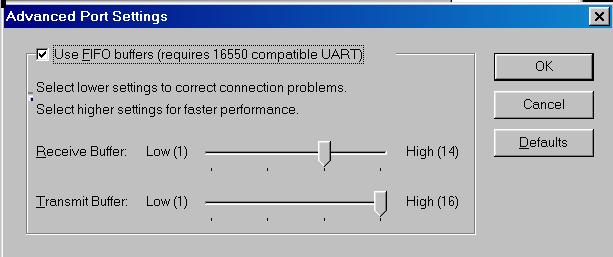
Try resetting the FIFO buffers in your dial-up networking connection icon. Open my computer, open dial-up networking, click on your connection icon with the right mouse button. Click on properties with the left mouse button. Click on the configuration button. Click on the connections tab. Click on the port settings button. Make sure both slider bars are set to the third notch.Click okay. Click okay again. That's it.From this:

To this:

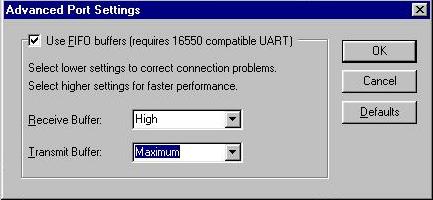
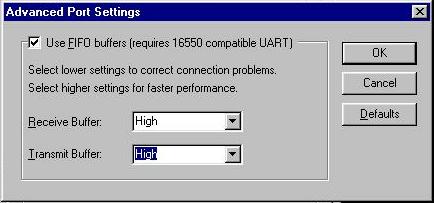
In Windows Me, it looks slightly different.
From this:

To this:

Here is another trick you can try to prevent disconnects:
- Go to Modems in Control Panel (Start - Settings - Control Panel)
- From Modems select Properties, select the Connection Tab, then click the Advanced button
- In the Extra settings dialogue box, enter S10=50; this will force the modem to stay connected without a carrier for up to 5 seconds.
Where can I learn
more about V.90/56K modems?
include ("../footer.info") ; ?>