
|
Windows Technical Help |
|
|
Windows Technical Help |
1. Double click on My Computer
1. Click on Start Button
1a. Select Settings -> Control Panel
2. Double click on the folder Dial-Up Networking
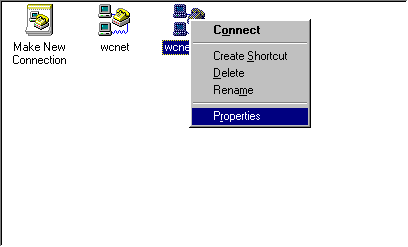
3. Click on your connection to WCNet with the right mouse button. A list will appear. In that list, click on properties with the left mouse button
4. Change the phonenumber to the new number we gave you.
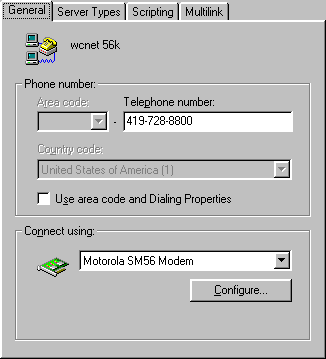
Click ok to close the window, and you should be back in the dial up networking folder.
5. Close the dial up networking window by clicking on the X in the top right corner of the window. ( if you have a windw labeled My Computer close that in a simalar fashion)
6. Double click on Shortcut to WCNet that is on the desktop.( or however you normally try to get on-line) A dialing window will appear.
7. Make sure the phone number is the correct number you just entered.
Ensure that there is no 1 in front of the phone number.
That's all there is to it. If you have problems contact WCNet at:
1-800-72-WCNET for help.
Please report problems with these pages to the Helpdesk pagemaster.
 E-mail US